Billing per controller, not per screen
Two friends on one PS5 pay for their own time. Add or remove a controller mid-game and GameHub keeps each one's clock separately.
P1 1:14 ₹140P2 1:05 ₹100P3 0:20 ₹60
GameHub is the counter software for gaming cafés. It times each controller on its own clock, takes offers off by itself and keeps billing when the internet drops. Works for PS5, PS4, Xbox, PC, racing sims and VR.
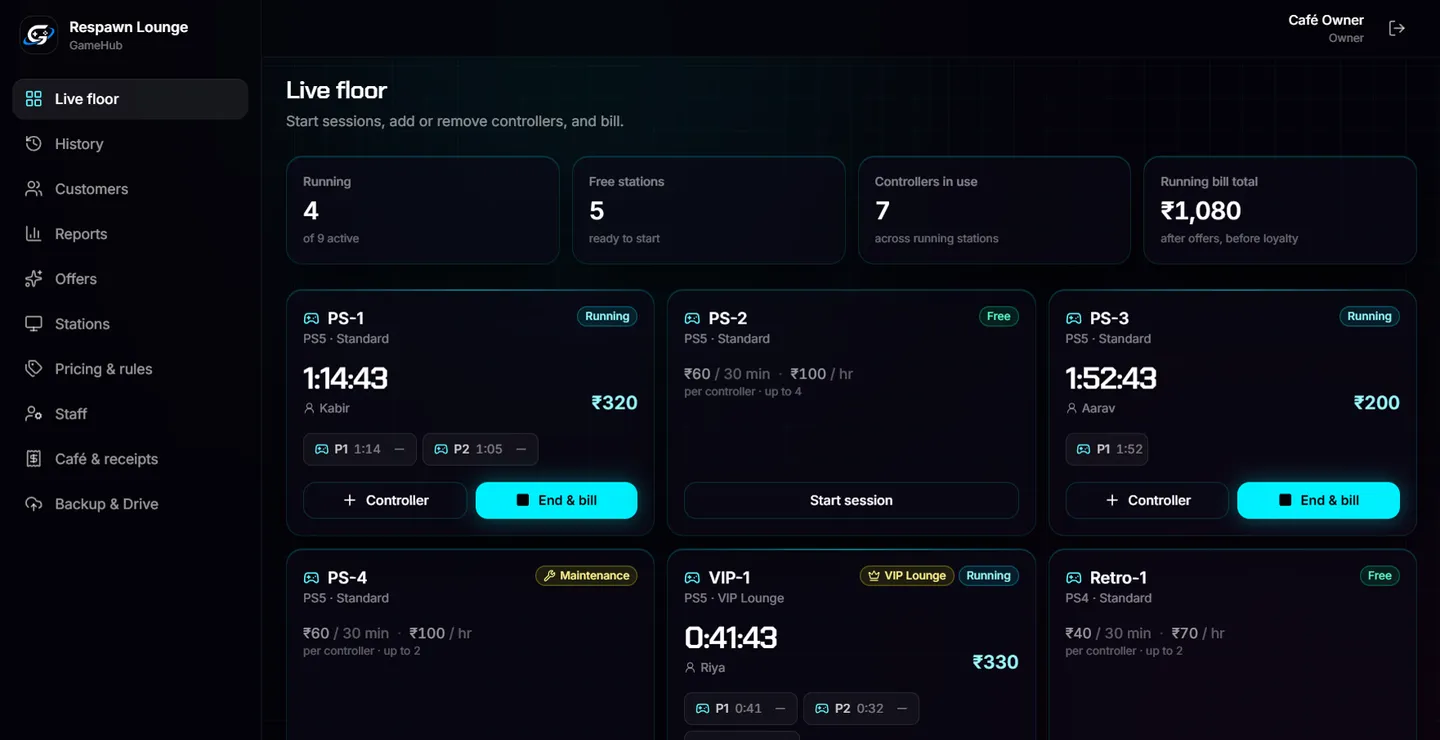
 Live floor · Respawn Lounge
Try it: Start PS-2, add a controller, then End & bill.
Respawn Lounge
Move your cursor over the notebook to see the same evening in GameHub. On a phone, drag your finger.
Scroll to run the clock. Watch stations fill up, the money add up, and the day back itself up while you sleep.
Every feature comes from the counter: friends sharing a PS5, the VIP lounge, the Saturday rush, the end-of-night tally.
Two friends on one PS5 pay for their own time. Add or remove a controller mid-game and GameHub keeps each one's clock separately.
Priced per seat and per headset, next to your consoles and PCs.
Pick a device and where it sits. Your rule prices it, like VIP Lounge = 150%.
| Per hour | Std | VIP |
|---|---|---|
| PS5 | ₹100 | ₹150 |
| Sim | ₹180 | ₹270 |
| VR | ₹250 | ₹380 |
Happy hours and weekend deals come off the bill automatically.
Found by phone number. Points on every bill, tiers for regulars.
Revenue per day, busiest hours, top stations and customers.
58 or 80 mm, with your café name and GSTIN. Prints when a bill is paid.
Everything lives on your counter PC, with a safety copy every hour.
After closing, an Excel file with every bill, the day's summary, customers and staff activity goes to your own Drive. If the internet is down, it waits and retries.
These are actual GameHub screens with demo data, not mock-ups.
The live floor: every station, every controller's time and the running amount. Start, add a controller or bill in one tap.
Pick a device, where it sits, how many players and how long. This uses the same rules GameHub uses at the counter.
Respawn Lounge
Prices are examples. You set your own rates and offers.
Paper is free but leaks money. Cloud tools stop when the Wi-Fi does. GameHub keeps billing either way.
| What you need | GameHub | Paper register | Typical cloud café software |
|---|---|---|---|
| Keeps billing with no internet | Yes | Yes | Usually not |
| Each controller billed on its own clock | Yes | By hand | Varies |
| VIP zones priced automatically | Yes | No | Varies |
| Racing sims and VR on the same floor | Yes | No | Varies |
| Offers taken off the bill by themselves | Yes | No | Often |
| Loyalty points and tiers | Yes | No | Often |
| Daily Excel backup to your own Google Drive | Yes | No | Rarely |
| Your data stays on your own PC | Yes | Yes | On their server |
| Extra cloud or server fees | None | None | Usually, every month |
| What you pay for | One software licence: monthly, yearly or lifetime | Paper, and lost bills | Subscription plus hosting |
"Typical cloud café software" describes common online tools in general, not any one product. Check each product's own details.
New features arrive as updates. Your bills, customers and settings stay exactly where they are.
We release an update
You get the new GameHub installer.
Install it over the old one
Close GameHub, run the installer, open it again.
Your data is untouched
It lives separately from the app, and GameHub upgrades it safely on first start.
Still deciding? Message us on WhatsApp and we’ll walk you through it.
No. Billing, offers, loyalty, reports and receipts all work offline. Internet is only used for the daily Excel backup to Google Drive, and that waits until you're back online.
Install GameHub on the new PC, connect the same Google account and press Restore. Your bills, customers and settings come back from the latest backup. You'll get a new activation key for the new PC.
GameHub shows a machine code for your PC. Send it to us and you get an activation key that works on that PC. It is one software licence: choose monthly, yearly or lifetime. There are no cloud or server fees on top, because GameHub runs on your own PC.
Any 58 mm or 80 mm thermal receipt printer with a Windows driver. Pick it once in Café & receipts and use Test print.
No. Staff can run the counter. Only the owner can change prices, offers, stations and staff, and every change is recorded.
Set up in about 10 minutes on any Windows 10 or 11 PC. One simple software licence (monthly, yearly or lifetime) with no cloud or server fees. Message us for a free demo.